
Employee Review
Most review templates are a blank form. You fill it in once, file it, and start from nothing next quarter. This one is a worked example. It is filled in the way a good review actually runs, so a first-time manager can see what to do rather than guess, and the agreed actions are already set up as tasks with owners and dates that sync to Outlook. Keep what helps, change the rest, delete anything that does not apply.
Desktop downloads a file you open in MindGenius. Online opens the framework so you can look at it first, then add it to your portfolio.
No MindGenius yet? Download Desktop or start an Online trial.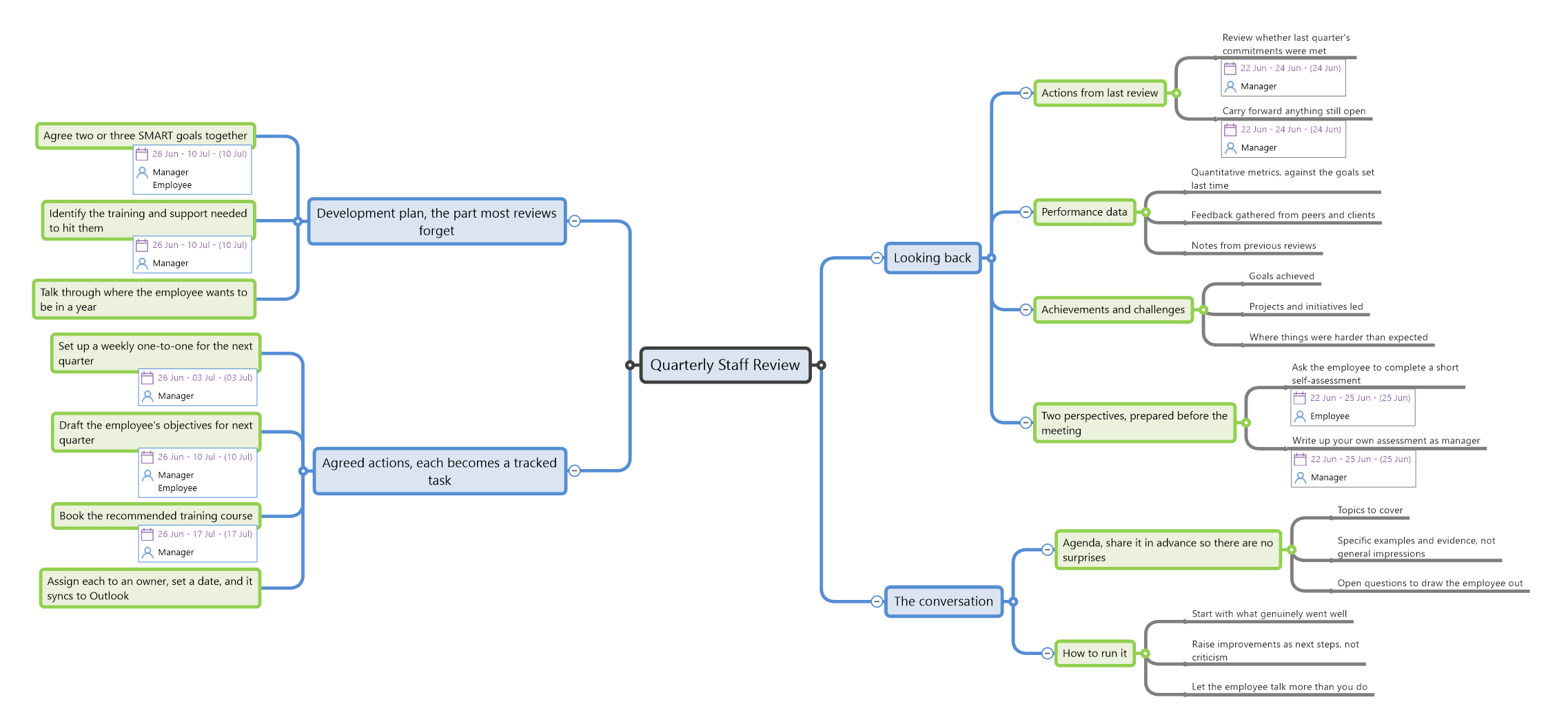
What's in the template
This is a worked example, not a blank form. Four stages take a manager from preparing for the review through to the development plan, with the actions already set up as tasks. The items marked with an owner are real MindGenius tasks carrying a person and a date. Keep them, edit them, or delete them in a keystroke.
Looking back
- Actions from last review
- Review whether last quarter's commitments were metManager
- Carry forward anything still openManager
- Performance data
- Quantitative metrics, against the goals set last time
- Feedback gathered from peers and clients
- Notes from previous reviews
- Achievements and challenges
- Goals achieved
- Projects and initiatives led
- Where things were harder than expected
- Two perspectives, prepared before the meeting
- Ask the employee to complete a short self-assessmentEmployee
- Write up your own assessment as managerManager
The conversation
- Agenda, share it in advance so there are no surprises
- Topics to cover
- Specific examples and evidence, not general impressions
- Open questions to draw the employee out
- Where do you see room to grow or develop?
- What support do you need to deliver what is expected?
- What check-in schedule works without feeling micro-managed?
- How to run it
- Start with what genuinely went well
- Raise improvements as next steps, not criticism
- Let the employee talk more than you do
Agreed actions
- Set up a weekly one-to-one for the next quarterManager
- Draft the employee's objectives for next quarterManager + Employee
- Book the recommended training courseManager
- Assign each to an owner, set a date, and it syncs to Outlook
Development plan
- Agree two or three SMART goals togetherManager + Employee
- Identify the training and support needed to hit themManager
- Talk through where the employee wants to be in a year
It does not stop when the meeting ends
A static template's job is over once the form is filled in. This one is just starting. The agreed actions carry owners and dates, sync to Outlook, and you track progress against them on the same map between reviews. Add a branch each quarter and the map becomes a running record of how someone has actually developed, not a stack of filed forms nobody reopens.