
Presentation
Presentations are badly taught. Most of the effort goes into beautifully formatted slides, which leaves no time for the part that matters: the substance, the argument, the conclusion, the what-now. The fix is to start much further back, before a single slide. Why are you presenting at all? What do you actually want to achieve? Who is in the room, who ought to be, and what does each of them need in order to follow the argument and reach the decision? A presentation built as slides is decoration. A presentation built as an argument changes what the room thinks or does.
Before you open the slide editor: why am I doing this, what do I want to achieve, and what does this room need to leave understanding. The slides come last, and they come short.
Desktop downloads a file you open in MindGenius. Online opens the framework so you can look at it first, then add it to your portfolio.
No MindGenius yet? Download Desktop or start an Online trial.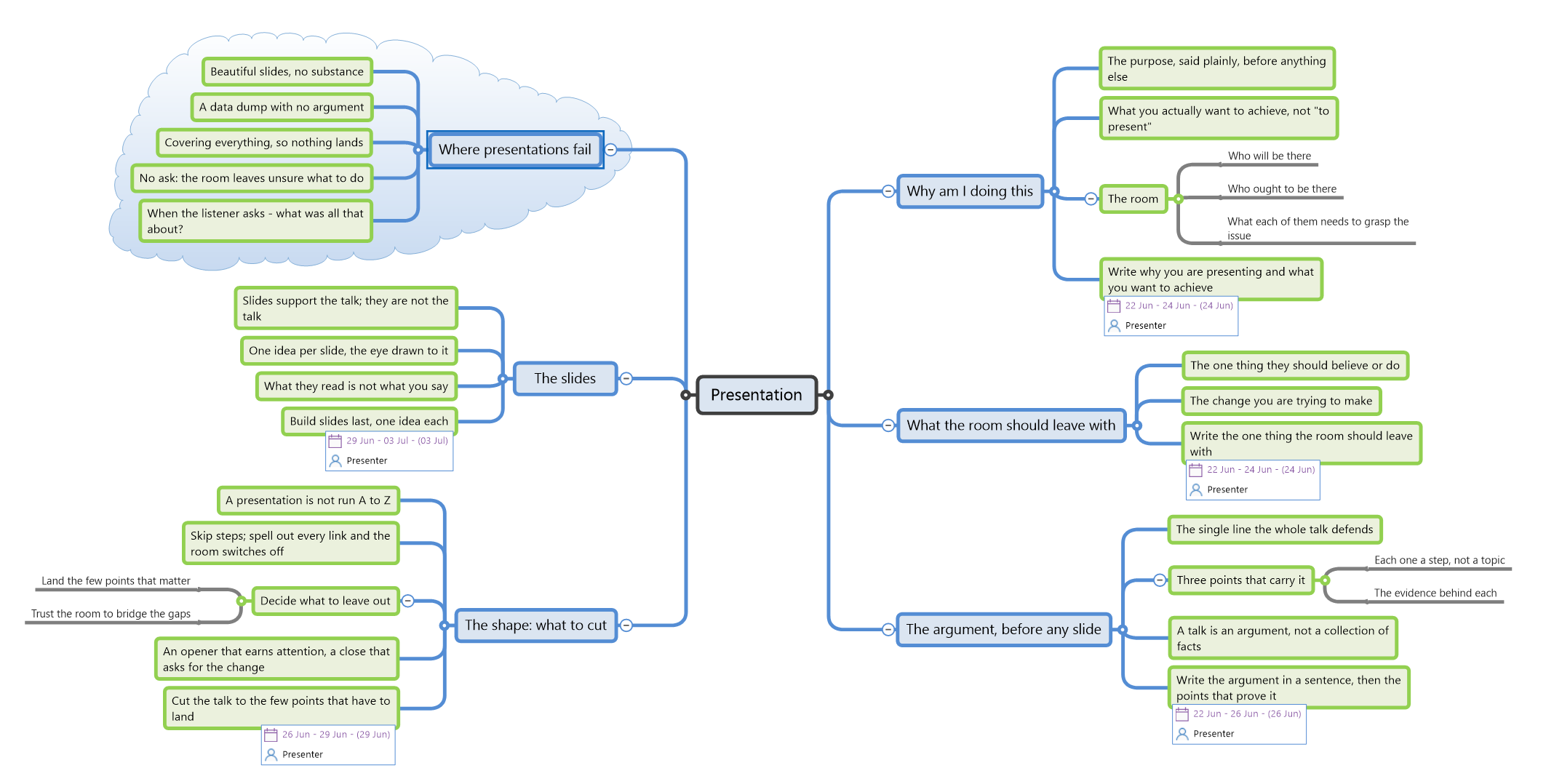
What's in the template
A worked plan in the order that produces a talk worth sitting through: purpose first, then the argument, then a deliberate decision about what to cut, and only then the slides. The early branches carry the weight, because a presentation with beautiful slides and no argument is the most common failure there is. The thinking stays open. Only the genuine preparation becomes tracked tasks.
A presentation is not run from A to Z. Skip steps, land the few points that matter, and trust the room to bridge the gaps. Keep it minimal, keep it sharp.
Why am I doing this
- The purpose, said plainly, before anything else. A talk given because it was expected, with no clear purpose, is where the formatted nonsense comes from
- What you actually want to achieve, not "to present". The presentation is a means, not the goal
- The room: who will be there, who ought to be there, and what each of them needs in order to grasp the issue, the argument and the decision
- Write why you are presenting and what you want to achievePresenter
What the room should leave with
- The one thing they should believe or do once you stop talking. If you cannot name it, the room will not find it for you
- The change you are trying to make, stated as something that happens after the talk, not during it
- Write the one thing the room should leave withPresenter
The argument, before any slide
- The single line the whole talk defends. Everything in the presentation either supports it or comes out
- The three points that carry it, each one a step in the reasoning rather than a topic, with the evidence behind each
- A talk is an argument, not a collection of facts. Facts without an argument are a data dump
- Write the argument in a sentence, then the points that prove itPresenter
The shape: what to cut
- A presentation is not run A to Z. Spell out every link in the chain and the room switches off before you reach the point
- Decide what to leave out: land the few points that matter and trust the room to bridge the gaps. What you cut matters as much as what you keep
- An opener that earns attention, and a close that asks for the change you named
- Cut the talk to the few points that have to landPresenter
The slides
- Slides support the talk; they are not the talk. Built last, once the argument holds
- One idea per slide, the eye drawn to the thing that matters
- What the room reads is not what you say. A slide you read aloud is a slide doing your job badly
- Build slides last, one idea eachPresenter
Where presentations fail
- Beautiful slides, no substance. Effort spent on formatting that should have gone on the argument
- A data dump with no argument, leaving the room to assemble the point themselves
- Covering everything, so nothing lands. Completeness is not the goal; a decision is
- No ask, so the room leaves unsure what to do, and someone quietly wonders what that was all about
Why this is the part that matters
The slide tools are very good at making slides look professional, and that is exactly the trap: a polished deck feels like progress while the argument underneath is still missing. What no slide editor asks you is why you are presenting, what the room should leave believing, or which two-thirds of your material to cut. Those are decisions made before the editor is open, with the whole talk in view. That is exploration before commitment. The formatting comes after. MindGenius is built for the thinking that comes first.